Why Integration Matters in SAP Projects
No SAP system operates in isolation. Every company connects SAP to dozens of external systems: suppliers, customers, banks, government tax portals, e-commerce platforms, warehouse automation systems, and third-party logistics providers. The way these connections work is called integration, and it is one of the most critical (and often underestimated) aspects of any SAP implementation. For middleware-based integration, see our SAP CPI guide.
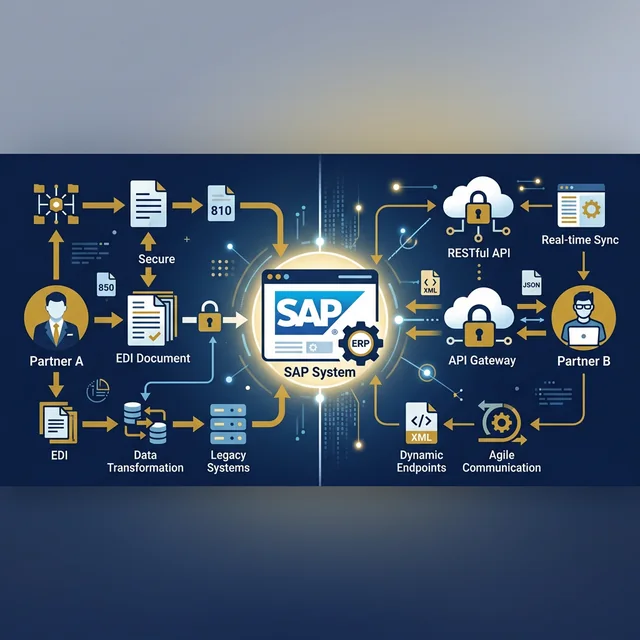
In 2026, there are two dominant integration paradigms in the SAP world: EDI (Electronic Data Interchange) and API (Application Programming Interface). Both serve the purpose of exchanging data between systems, but they work very differently and are suited for different scenarios.
This guide will explain both approaches in plain language, compare them head-to-head, and help you understand which one to use in different situations. Whether you are a functional consultant designing integration flows or a fresher preparing for interviews, this knowledge is essential.
What Is EDI?
EDI stands for Electronic Data Interchange. It is a standardized format for exchanging business documents between companies electronically. EDI has been around since the 1970s and remains the backbone of B2B (business-to-business) communication in industries like retail, automotive, manufacturing, and logistics.
Here is how EDI works in a typical SAP scenario:
Customer Sends EDI Purchase Order
A customer sends a purchase order to your company. Instead of sending a paper document or an email, they send an EDI message (called an EDI 850 in the ANSI X12 standard or an ORDERS message in the UN/EDIFACT standard).
Message Travels via VAN or AS2
The EDI message travels through a Value Added Network (VAN) or an AS2 connection to your company's EDI system.
EDI Middleware Translates to IDoc
Your EDI middleware (such as SAP B2B Add-On, Seeburger, or OpenText) translates the EDI message into an SAP IDoc (Intermediate Document).
IDoc Posted into SAP Automatically
The IDoc is posted into SAP, automatically creating a sales order (transaction VA01) without any human intervention.
Outbound IDoc Sent to Customer
When the order is shipped, SAP generates an outbound IDoc (ASN/Ship Notice), which is converted back to EDI format (EDI 856 or DESADV) and sent to the customer.
Common EDI Message Types in SAP
| ANSI X12 | EDIFACT | SAP IDoc Type | Business Document |
|---|---|---|---|
| 850 | ORDERS | ORDERS05 | Purchase Order |
| 810 | INVOIC | INVOIC02 | Invoice |
| 856 | DESADV | DELVRY03 | Advance Ship Notice |
| 855 | ORDRSP | ORDRSP05 | PO Acknowledgment |
| 820 | REMADV | PEXR2002 | Payment Advice |
What Is API Integration?
API stands for Application Programming Interface. In the context of SAP integration, APIs are standardized web services that allow systems to communicate with each other in real time over the internet using protocols like REST (HTTP/JSON) or OData.
Here is how API integration works in a typical SAP scenario:
E-Commerce Website Receives Order
An e-commerce website receives a customer order.
Website Calls SAP S/4HANA API
The website's backend immediately calls an SAP S/4HANA API (for example, the Sales Order API: API_SALES_ORDER_SRV).
JSON Data Sent to S/4HANA
The API call sends the order data in JSON format directly to S/4HANA.
S/4HANA Validates and Creates Order
S/4HANA validates the data, creates the sales order, and returns a response with the order number in milliseconds.
Customer Sees Real-Time Confirmation
The e-commerce website displays the order confirmation to the customer in real time.
Types of APIs in SAP S/4HANA
| API Type | Protocol | Use Case | Example |
|---|---|---|---|
| OData V2/V4 | REST/HTTP | CRUD operations on business objects | Create/Read/Update Purchase Orders |
| SOAP | XML/HTTP | Complex business processes | Financial posting with validation |
| RFC/BAPI | SAP proprietary | Legacy integrations | BAPI_PO_CREATE1 for PO creation |
| Events/Webhooks | REST/HTTP | Event-driven architecture | Notify external system when a PO is approved |
EDI vs API: The Complete Comparison
Now that you understand both approaches, let us compare them across every dimension that matters in a real project:
EDI (Traditional)
- Speed: Batch (minutes to hours)
- Data Format: Fixed-format (X12, EDIFACT)
- Direction: Asynchronous (fire-and-forget)
- Setup Cost: High (VAN fees, middleware licenses)
- Industry Standard: Mandated in retail, automotive, pharma
- Error Handling: Manual (IDoc monitoring via
WE02) - Scalability: Excellent for high-volume batch
- SAP Tools: IDoc framework (
WE20,WE21,BD87)
API (Modern)
- Speed: Real time (milliseconds)
- Data Format: Flexible (JSON, XML, OData)
- Direction: Synchronous (request-response)
- Setup Cost: Low to moderate (cloud-based)
- Industry Standard: Preferred in tech, e-commerce, startups
- Error Handling: Automated (HTTP status codes, retry logic)
- Scalability: Excellent for high-frequency real time
- SAP Tools: SAP API Business Hub, CPI
| Dimension | EDI | API |
|---|---|---|
| Speed | Batch (minutes to hours) | Real time (milliseconds) |
| Data Format | Fixed-format (X12, EDIFACT) | Flexible (JSON, XML, OData) |
| Direction | Asynchronous (fire-and-forget) | Synchronous (request-response) |
| Setup Cost | High (VAN fees, middleware licenses) | Low to moderate (cloud-based) |
| Industry Standard | Mandated in retail, automotive, pharma | Preferred in tech, e-commerce, startups |
| Error Handling | Manual (IDoc monitoring via WE02) | Automated (HTTP status codes, retry logic) |
| Scalability | Excellent for high-volume batch | Excellent for high-frequency real time |
| SAP Tool | IDoc framework (WE20, WE21, BD87) | SAP API Business Hub, CPI |
When to Use EDI
EDI is the right choice in these scenarios:
- Your trading partner mandates it. Large retailers like Walmart, Target, Amazon (Vendor Central), and Tesco require EDI compliance from all their suppliers. If you sell to these companies, you must support EDI. This is not optional
- High-volume, batch document exchange. If you process 10,000 invoices per day from 500 suppliers, EDI with IDoc processing is more efficient than making 10,000 individual API calls. The batch nature of EDI is a strength for bulk transactions
- Automotive industry. The automotive supply chain (VDA in Germany, AIAG in the US) has standardized on EDI for JIT (Just-In-Time) delivery schedules, ASNs, and invoicing. Major OEMs like BMW, Toyota, and Tata Motors require EDI from tier-1 suppliers
- Compliance and audit requirements. EDI provides a clear, standardized audit trail. Each message has a unique control number, acknowledgment (997/CONTRL), and archiving capabilities. This is critical in regulated industries like pharma and food
When to Use APIs
API integration is the right choice in these scenarios:
- Real-time data is required. If an e-commerce website needs to check SAP inventory before showing product availability, you need an API. EDI cannot provide real-time stock levels
- Cloud-to-cloud integration. Connecting SAP S/4HANA Cloud to Salesforce, Workday, Ariba, or SuccessFactors is best done through APIs. SAP provides pre-built API packages in the SAP API Business Hub for these scenarios
- Mobile and web applications. Any Fiori app, custom web app, or mobile app that reads or writes SAP data uses OData APIs. This is the standard pattern for modern SAP UI development
- Event-driven scenarios. When you need SAP to notify external systems about events (a PO was approved, a delivery was completed, an invoice was posted), event-based APIs with SAP Event Mesh are the right approach
- Third-party SaaS integration. Modern SaaS platforms (Stripe for payments, Twilio for notifications, SendGrid for emails) provide REST APIs. Integrating these with SAP requires API-to-API connectivity
The Modern SAP Integration Architecture in 2026
In practice, most large SAP landscapes use both EDI and API integration. They are not mutually exclusive. Here is what a modern SAP integration architecture looks like:
- SAP Integration Suite (CPI) serves as the central integration hub. It handles both API-based and EDI-based integrations through a single platform
- EDI connections handle B2B document exchange with trading partners (suppliers, customers, logistics providers)
- API connections handle cloud-to-cloud integrations (Salesforce, Ariba, SuccessFactors, custom apps)
- Event Mesh handles event-driven integrations (notifications, triggers, real-time alerts)
- SAP API Business Hub provides a catalog of 400+ pre-built APIs for S/4HANA, covering virtually every business object and process
Integration Skills for SAP Consultants
Whether you specialize in EDI or API, integration knowledge is increasingly valuable. Here is what each role needs to know:
- MM/SD consultants: Understand IDoc configuration (partner profiles, port setup, message types) and basic API concepts. You will configure EDI for PO, invoice, and delivery note exchange in every project
- Technical consultants: Know how to build integration flows in SAP CPI, debug IDoc errors (
WE02,WE05,BD87), and develop custom REST/OData services - Solution architects: Design integration blueprints that combine EDI and API approaches based on business requirements, partner capabilities, and cost considerations
Key Takeaways
- EDI is a standardized, batch-based approach for B2B document exchange that remains mandatory in retail, automotive, and pharma
- APIs are modern, real-time interfaces that enable cloud integration, mobile apps, and event-driven architectures
- Most modern SAP landscapes use both EDI and APIs, connected through SAP Integration Suite (CPI)
- EDI uses IDocs in SAP, while APIs use OData/REST services
- The choice depends on partner requirements, latency needs, data volume, and industry standards
- Integration skills (both EDI and API) are highly valued and increasingly required for SAP consultants
Next Step: Explore our SAP S/4HANA training where we cover both EDI and API integration with hands-on exercises using IDocs and OData services.