What Is SAP CPI?
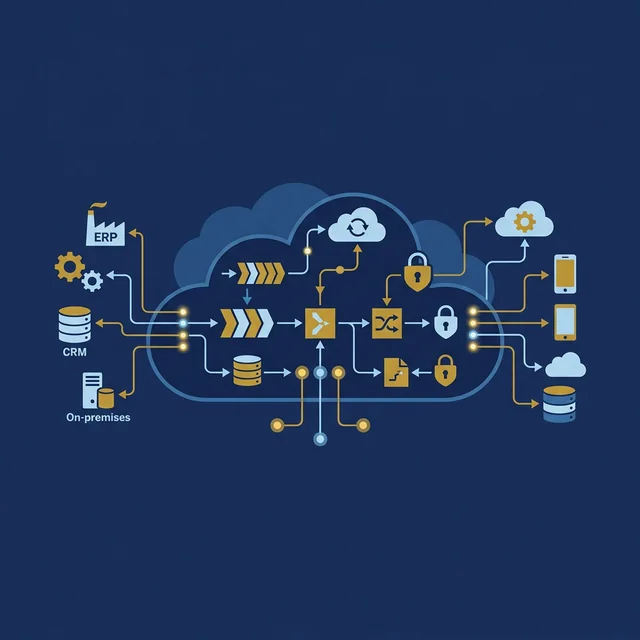
SAP CPI stands for Cloud Platform Integration. It is now officially called SAP Integration Suite, but most people in the SAP ecosystem still refer to it as CPI. It is SAP's cloud-based integration platform that connects SAP systems with other SAP systems, non-SAP systems, cloud applications, and on-premise systems.
Think of CPI as a translator and traffic controller for data. When your S/4HANA system needs to send a purchase order to a supplier's system that speaks a completely different data format, CPI sits in the middle, translates the message, and delivers it to the right destination. When an external HR system needs to create an employee record in SAP SuccessFactors, CPI handles the connection.
Before CPI, SAP customers used SAP PI/PO (Process Integration/Process Orchestration) for integration. PI/PO was an on-premise tool that required dedicated servers, Java expertise, and significant infrastructure investment. CPI replaces PI/PO with a cloud-native solution that is simpler to set up, easier to maintain, and designed for the modern cloud landscape.
Why Should Functional Consultants Care About CPI?
This is the most important question. You might think, "I am a functional consultant. Integration is for technical people." That was true in the SAP ECC era. In the S/4HANA era, it is no longer the case. Here is why:
- Every S/4HANA project has integrations. No company runs SAP in isolation. Every implementation connects SAP to external systems (banks, tax portals, suppliers, customers, HR systems, CRM). As a functional consultant, you need to understand how your module's data flows to and from these systems
- You design the integration requirements. When the business says "we need our POs to automatically go to the supplier," you are the one who writes the functional specification. If you do not understand CPI, you cannot design this properly
- CPI is part of RISE with SAP. SAP includes CPI (Integration Suite) as part of RISE with SAP licenses. This means every RISE customer has access to CPI, and it is the recommended integration tool for all new projects
- Career differentiation. Functional consultants who understand integration are more valuable than those who do not. In 2026, job descriptions for SAP MM, SD, and FICO consultants increasingly list "understanding of SAP CPI" or "integration experience" as preferred skills
How CPI Works: The Basics
CPI works through a concept called Integration Flows (iFlows). An integration flow is a visual representation of how data moves from a source system to a target system. Let us break down the key components:
Sender
The system that sends the data. This could be SAP S/4HANA, an external supplier system, a bank, or any application that needs to send information.
Receiver
The system that receives the data. This could be another SAP system, a cloud application like Salesforce, or a government tax portal.
Adapter
The adapter is how CPI connects to the sender and receiver systems. Different systems speak different protocols, so CPI provides adapters for each protocol:
| Adapter | Protocol | Common Use Case |
|---|---|---|
| IDoc | SAP IDoc | Connecting to SAP ECC or S/4HANA on-premise |
| HTTP/REST | REST API | Connecting to modern cloud apps and APIs |
| SOAP | SOAP Web Service | Connecting to legacy systems and older services |
| SFTP | Secure File Transfer | Exchanging files (CSV, XML) with banks and partners |
| OData | OData V2/V4 | Connecting to S/4HANA Cloud APIs |
| SMTP/IMAP | Sending email notifications with attachments | |
| Ariba | Ariba Network | Purchase order and invoice exchange via Ariba |
Message Mapping
This is where the "translation" happens. The source system sends data in one format, and the target system expects data in a different format. Message mapping defines how fields from the source are mapped to fields in the target. For example, the source system might call a field "vendor_number" while SAP calls it "LIFNR." The message mapping connects these two fields.
Content Modifier
This component allows you to change the message content, add headers, set properties, or modify the payload as it flows through CPI. For example, you might add a timestamp or change a date format from MM/DD/YYYY to YYYY-MM-DD.
Router
A router splits the message flow based on conditions. For example, if the purchase order is for Plant 1000, route it to Supplier A's system. If it is for Plant 2000, route it to Supplier B's system.
Common CPI Scenarios for Functional Consultants
Here are the integration scenarios you will encounter most frequently in real projects, organized by module:
MM (Materials Management) Scenarios
- PO transmission to suppliers: SAP generates a purchase order. CPI picks it up (via IDoc or API), converts it to the supplier's required format (PDF, XML, EDI), and sends it to the supplier via SFTP, email, or Ariba Network
- Invoice receipt from suppliers: Suppliers send electronic invoices. CPI receives them (via SFTP, API, or EDI), validates the format, maps the fields to SAP's invoice format, and posts them into S/4HANA using the Invoice Verification API or IDoc
- Goods receipt integration with WMS: When a warehouse management system (WMS) confirms goods receipt, it sends a message to CPI. CPI transforms this into an SAP goods receipt posting (
MIGOequivalent API call)
SD (Sales and Distribution) Scenarios
- Sales order from e-commerce: An online store receives customer orders. CPI takes the order data, maps it to SAP's sales order format, and creates the order in S/4HANA using the Sales Order API
- Delivery notification to customers: When a delivery is created and shipped in SAP, CPI generates a shipment notification (ASN) and sends it to the customer's system
- Pricing sync with external systems: SAP pricing data (condition records) needs to be synced with an e-commerce platform or a dealer portal. CPI extracts pricing data and pushes it to the external system on a scheduled basis
FICO (Finance and Controlling) Scenarios
- Bank statement integration: Banks provide daily account statements in MT940 or CAMT.053 format. CPI receives these files via SFTP, converts them to SAP's electronic bank statement format, and uploads them for automatic reconciliation
- Payment file transmission: SAP generates payment files (for vendor payments, salary payments). CPI picks up the payment file, converts it to the bank's required format (PAIN.001 for SEPA, ACH for US), and sends it to the bank's secure file server
- GST/Tax portal integration: In India, businesses must submit GST returns electronically. CPI can extract invoice data from SAP, format it according to GST portal requirements, and submit it via API
CPI vs PI/PO: What Changed?
If you have worked with SAP PI/PO, here is how CPI compares:
| Feature | SAP PI/PO | SAP CPI (Integration Suite) |
|---|---|---|
| Deployment | On-premise (requires dedicated server) | Cloud-based (SaaS, no infrastructure) |
| Design Tool | Enterprise Services Builder (ESR) | Web-based Integration Flow Designer |
| Learning Curve | Steep (Java, XI protocol knowledge) | Moderate (visual, drag-and-drop) |
| Maintenance | Customer managed (patches, upgrades) | SAP managed (automatic updates) |
| Pre-built Content | Limited | 2,000+ pre-built integration packages |
| Status | Maintenance mode (end of life: 2027) | Active development (SAP's strategic platform) |
The SAP Integration Suite: Beyond Just CPI
SAP CPI is actually one component of the larger SAP Integration Suite. The full suite includes these capabilities:
- Cloud Integration (CPI): The core integration engine that processes integration flows. This is what we have been discussing
- API Management: Allows you to create, publish, and manage APIs. You can expose SAP data as APIs for external consumers, apply rate limiting, and monitor API usage
- Open Connectors: Provides pre-built connectors to 170+ non-SAP cloud applications (Shopify, HubSpot, Stripe, Zendesk, etc.). This drastically reduces the effort to connect SAP with popular SaaS platforms
- Integration Advisor: Uses machine learning to suggest message mappings based on industry standards (like GS1 for retail or VDA for automotive). This speeds up mapping work significantly
- Trading Partner Management: Manages B2B trading partner profiles, agreements, and EDI configurations. This replaces the traditional EDI middleware for many scenarios
- Event Mesh: Enables event-driven integration where systems react to events in real time. For example, when a PO is approved in S/4HANA, an event is published, and CPI can trigger downstream actions like sending the PO to the supplier
Pre-Built Integration Packages
One of CPI's biggest advantages is the library of pre-built integration packages. SAP and its partners have created over 2,000 ready-made integration packages that you can download and use with minimal configuration. Here are some of the most commonly used packages:
- SAP S/4HANA to SAP Ariba: Purchase order, invoice, and sourcing data exchange
- SAP S/4HANA to SAP SuccessFactors: Employee master data synchronization
- SAP S/4HANA to SAP Concur: Expense data and cost center replication
- SAP S/4HANA to Salesforce: Customer, product, and order data sync
- SAP S/4HANA to Microsoft Teams: Notifications and approval workflows
- Bank Integration: SWIFT MT messages, SEPA payments, bank statement processing
How to Get Started with CPI
If you are a functional consultant who wants to learn CPI, here is a practical roadmap:
Get Access to a CPI Tenant
SAP offers a free trial of SAP Integration Suite through SAP BTP Free Tier. You can sign up at the SAP BTP Cockpit and activate the Integration Suite trial. This gives you a fully functional CPI environment to practice with.
Explore Pre-Built Packages
Browse the SAP Business Accelerator Hub and explore the pre-built integration packages for your module. For example, if you are an MM consultant, look at the S/4HANA-to-Ariba package. Download it, open the integration flow, and study how it works.
Build a Simple Integration Flow
Start with something simple: create an integration flow that reads data from an HTTP endpoint and writes it to a file. This teaches you the basics of iFlow design, adapter configuration, and deployment.
Learn Message Mapping
Message mapping is the skill you will use most. Practice mapping fields between different data formats (XML to JSON, flat file to IDoc structure). The CPI mapping editor is visual and intuitive, so it is easier to learn than PI/PO's mapping tool.
Understand Monitoring
Learn how to monitor integration flows in CPI's monitoring dashboard. This is where you check if messages were processed successfully, debug errors, and view message payloads. As a functional consultant, you will frequently be asked to check why a particular PO or invoice did not reach the target system, and the monitoring tool is your first stop.
CPI Skills and Career Impact
The demand for CPI skills is growing rapidly. Here are some data points from the SAP job market in 2026:
- SAP Integration Suite/CPI appeared in 35% of all SAP job postings on LinkedIn India in January 2026 (up from 15% in 2024)
- CPI-certified consultants command a salary premium of 15 to 25% compared to pure functional consultants at the same experience level
- SAP offers a certification for CPI:
C_CPI_15(SAP Certified Development Associate - SAP Integration Suite). This is a development-focused certification, but SAP also offers a less technical "SAP Integration Suite Business Practitioner" course - Consulting firms like Accenture, Deloitte, Capgemini, and Infosys are actively training their functional consultants on CPI basics as part of their S/4HANA upskilling programs
Key Takeaways
- SAP CPI (now SAP Integration Suite) is SAP's cloud-based integration platform that replaces on-premise PI/PO
- CPI connects SAP systems with other SAP and non-SAP systems using integration flows (iFlows)
- Functional consultants need CPI knowledge because they design integration requirements and troubleshoot integration issues
- CPI provides 2,000+ pre-built integration packages that dramatically reduce implementation time
- PI/PO reaches end of maintenance in 2027, making CPI migration mandatory for all customers
- CPI skills are increasingly listed in SAP job postings and command a salary premium
- You can start learning CPI for free using SAP BTP Free Tier
Next Step: Ready to build your integration skills? Explore our SAP S/4HANA training programs where we include hands-on CPI exercises as part of the curriculum.