What Is a Purchase Info Record?
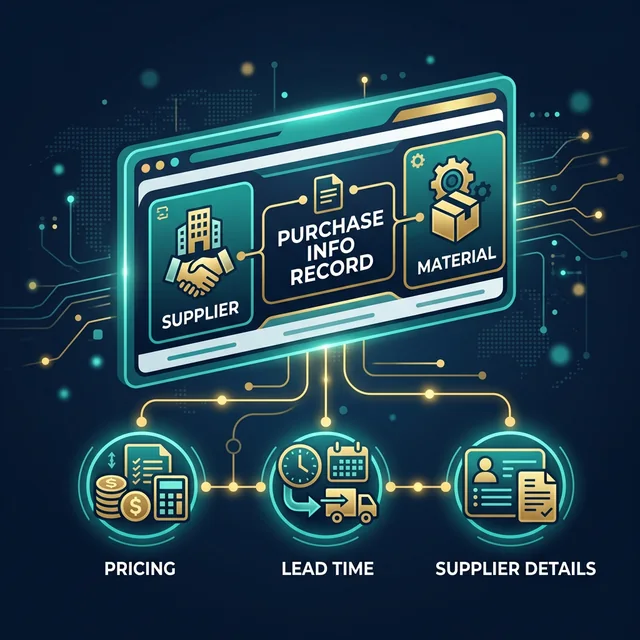
A Purchase Info Record (PIR) in SAP MM is a master data object that stores the relationship between a vendor (supplier) and a material. It contains purchasing-specific information such as the vendor's price for the material, delivery lead time, planned delivery time, payment terms, and any vendor-specific conditions.
Think of it this way: the Material Master tells SAP everything about the material itself (weight, dimensions, storage, accounting). The Vendor Master tells SAP everything about the supplier (address, bank details, payment terms). The Purchase Info Record connects these two and says: "This specific vendor supplies this specific material at this price with this lead time."
Purchase Info Records are critical because they drive automatic source determination. When a purchase requisition is converted to a purchase order, SAP can automatically suggest the vendor and price based on the PIR. Without a PIR, the buyer must manually enter vendor and pricing information every time. PIRs work together with the Source List and Quota Arrangement to enable fully automated sourcing.
The 4 Categories of Purchase Info Records
SAP supports four categories of Purchase Info Records, each designed for a different procurement scenario:
| Category | Name | When Used |
|---|---|---|
| Standard | Vendor + Material + Purchasing Org | Regular procurement of a specific material from a specific vendor |
| Subcontracting | Vendor + Material + Purchasing Org (SC) | Subcontracting procurement where you provide components to the vendor |
| Pipeline | Vendor + Material + Purchasing Org (Pipeline) | Utilities like electricity, water, or gas that are consumed continuously |
| Consignment | Vendor + Material + Purchasing Org (Consignment) | Material stored at your location but owned by the vendor until consumed |
How to Create a Purchase Info Record
Transaction: ME11 (Create Info Record) in ECC, or the "Manage Purchase Info Records" Fiori app in S/4HANA
Enter Vendor and Material
Enter the Vendor number and Material number. Select the Purchasing Organization and Plant (optional).
Choose Info Category
Select the Info Category: Standard, Subcontracting, Pipeline, or Consignment.
Fill General Data Screen
Enter the vendor's material number (if different from yours), the order unit, and planned delivery time.
Fill Purchasing Organization Data
Enter the net price, pricing conditions, payment terms, and Incoterms.
Add Optional Text Notes
Optionally enter text notes (for the PO header or item text) that should be copied to every PO created using this info record.
Save the Info Record
Save the info record. SAP assigns an info record number automatically.
Key Fields in the Purchase Info Record
| Field | Purpose | Example |
|---|---|---|
| Vendor Material Number | The material number used by the vendor (may differ from yours) | Your material: STEEL-001, Vendor calls it: TS-HRCOIL-8MM |
| Net Price | The negotiated price per unit of measure | INR 75,000 per MT |
| Planned Delivery Time | Expected lead time from PO to delivery (in days) | 14 days |
| Order Unit | The unit of measure the vendor uses for orders | MT (Metric Ton) vs. KG internally |
| Minimum Order Qty | Minimum quantity that must be ordered | 5 MT minimum |
| Conditions | Pricing conditions (discounts, surcharges, freight) | 5% discount for orders above 10 MT |
How PIR Connects to the Procurement Cycle
The Purchase Info Record plays a role at multiple stages of procurement:
- Source Determination: When converting a PR to a PO, SAP checks if a PIR exists for the material. If it does, the system suggests that vendor as a source with the price from the PIR
- PO Creation: When you create a PO and enter a vendor + material combination, SAP copies the price, conditions, delivery time, and other data from the PIR. This is part of the broader Procure-to-Pay cycle
- Automatic Update: When you post a PO with different conditions than the PIR, SAP can update the PIR automatically (controlled by the "Info Update" indicator in the PO)
- Price Comparison: The PIR provides a baseline for price comparison during sourcing. Buyers can check the last PO price versus the PIR price
Transactions for Managing Info Records
| Transaction | Purpose |
|---|---|
ME11 | Create Info Record |
ME12 | Change Info Record |
ME13 | Display Info Record |
ME15 | Flag Info Record for Deletion |
ME1M | List Info Records by Material |
ME1L | List Info Records by Vendor |
Key Takeaways
- Purchase Info Records link a vendor and material with procurement-specific data (price, lead time, conditions)
- There are 4 categories: Standard, Subcontracting, Pipeline, and Consignment
- PIRs drive automatic source determination and price defaulting in POs
- PIRs can be automatically updated when a PO with different pricing is saved
- Understanding PIRs is essential for any SAP MM consultant working on procurement
Next Step: Join our SAP MM training where we create and manage Purchase Info Records hands-on in a live S/4HANA system.